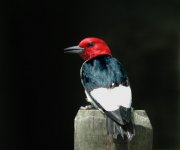
KCFoggin said:
I previously posted this in the gallery and, where I am happy with the shot overall as the sun was directly overhead, I was wondering if any of you have any ideas as to how to make the white in this shot less glaring. I tried selecting the area and using levels to a small extent but too much play made for an un-natural image. Curves weren't much better. Are there any tricks for whites like this?
There is no detail in the white area which is why it doesn't look right when you darken it. The rule of thumb with digital and slide photography is to expose for the highlights and let the shadows fall where they may. The best approach is to underexpose the original to preserve the detail in the white feathers. Then you use curves, levels etc. to bring the darker areas up to where you want, keeping the lighter areas pretty much as they were.
Here is a quick example of how I typically deal with this issue.
http://www.jayandwanda.com/digiscope/controlwhite.jpg
The first panel is the original unchanged exposure. Its dark. The EXIF data shows that I used a -0.7 EV adjustment. The relatively bright sky naturally caused the auto-exposure to make the image a bit darker than would have been optimal for the bird. The sky is too dark and murky since the camera probably tried to make it a middle gray value. But the flower looks nice. BTW, I expected this woodpecker to come to this flower. So I was prepared and had done test exposures ahead of time and verified the result in the camera's histogram.
The second panel shows the results when I make a duplicate layer in Photoshop and tweak curves for the bird and ignore what happens to the flower. The sky looks more normal. The bird and cactus look about right. But you can see that the flower's details get blown out - much like the white feathers in your picture.
The third panel shows the results when I add a layer mask to the second lightened layer and paint in a mask that lets the flowers from the original exposure show through.
There are other ways to accomplish this, but the principle to remember is that if your exposure does not maintain detail in an area of importance, no amount of post processing will revive the detail. With digital, this is often a problem with very bright areas of contrasty scenes. Sometimes, even exposure compensations are inadequate. In those cases only a double exposure can help - which isn't much help with a moving bird.
BTW, this image is from a little experiment I did to make a very high resolution image that also showed a lot of the bird's environment. I used 10 images taken through the scope with my CP5000 to construct a broad view image. Think of it as a digiscoped panorama. You can look at the 1/4 rez and 1/2 resolution images here.
http://www.jayandwanda.com/birds/woodpeckers/GilaWide_SM.jpg (350KB)
http://www.jayandwanda.com/birds/woodpeckers/GilaWide.jpg (1MB)